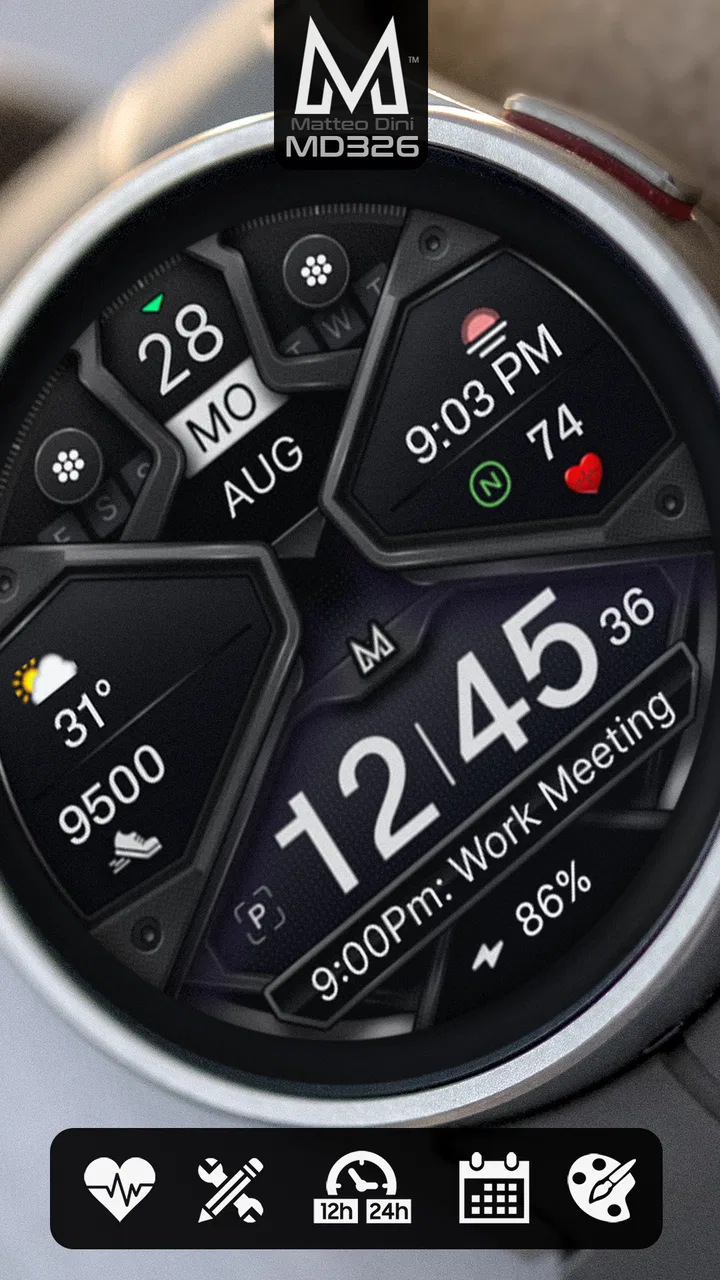
MD326 3D Modern Watch Face
- 4.6
- Rating
- 50.00K
- Installs
- $2.49
- Price
 Analysis by App-foxy
I approached MD326 3D Modern Watch Face as a personalization purchase rather than just another decorative screen for a Wear OS watch. That distinction matters because a watch face is visible many times a day, and small choices—layout, contrast, information density, and how quickly I can read it—affect whether I keep using it. This face is made by Matteo Dini MD ® Watch Faces, costs $2.49, and is rated for Everyone. It was released on Aug 9, 2023, and has built a solid audience with over 50 thousand installs.
The central appeal is straightforward: it gives a Wear OS device a customizable digital appearance with a distinctly modern, dimensional style. I found it most interesting for people who want more personality than a basic system face but still prefer digital information over traditional hands. It is not trying to be a minimalist blank canvas, and it is not the best fit for somebody who wants a completely plain clock. Its strength is the balance between a strong visual identity and enough adjustment to make the face feel more personal.
How the design feels in everyday use
The three-dimensional treatment gives the display more presence than a flat digital layout. That visual depth is the first thing I noticed, but it is also the feature that will divide opinion. Some people will enjoy the layered, technical look; others may find it busier than they want for a watch they glance at dozens of times. I would choose it when I want the watch to look like an intentional accessory rather than a neutral utility screen.
You May Also Like

 Blood Strike: 2.5 Anniversary
Blood Strike’s Loadouts Turn Every Drop Into a Tactical Gamble
A close look at Blood Strike’s custom loadouts: how fast access to signature weapons reshapes its battle royale rhythm, rewards preparation, and narrows the gap between fights.

 Pandora - Music & Podcasts
Pandora’s Music Is Easy to Start, but Harder to Recover
Pandora’s strength is its low-effort path from a seed to a station. Its weak spot is how much confidence it asks you to place in connection, setup, and quiet recovery.

 8 Ball Pool
8 Ball Pool Is Built on Rivalries, Rematches, and Routine
A close look at the rivalries, rematches, shared routines, and unanswered safety questions that turn a quick pool match into a persistent mobile community.

 Samsung Music
Samsung Music’s Quiet Strength Is Playing What You Already Own
Its reach comes less from spectacle than from dependable access to a personal library. That simplicity is both the app’s strongest retention engine and its ceiling.

 AccuWeather: Weather Radar
AccuWeather Review: A Quick, Clear Forecast for Everyday Decisions
For everyday plans, the best forecast is the one you can understand quickly. AccuWeather makes rain timing, radar, and local conditions easy to act on, with a few trade-offs.

 Hill Climb Racing
Why Hill Climb Racing Still Turns Crashes Into One More Run
A tiny car, a bumpy hill and one more upgrade: Hill Climb Racing keeps resurfacing because its simple chaos makes every near-miss feel personal.
More From Our News Desk



In daily use, readability should be the first test. A stylish face is only useful if I can understand it during a quick glance while walking, commuting, or checking the time during a meeting. The customization options are valuable here because they let the face move closer to my preferred balance between visual detail and immediate clarity. My practical advice is to begin with the simplest arrangement that still shows the information you actually check, then add detail only when it earns its place.
That approach also helps with the difference between a watch face that looks impressive in a preview and one that remains comfortable throughout the day. On a larger watch display, the dimensional design can feel expressive and well proportioned. On a smaller display, a crowded arrangement may require more attention. The right result depends on the watch itself, the screen size, and your eyesight, so I would spend a few minutes testing the face in real lighting instead of judging it only from a store image.
Customization that has a purpose
The useful part of customization is not simply having many switches to change. It is being able to shape the face around a routine. Someone who checks time and date frequently may want those elements to remain dominant. Someone who uses the watch as a quick dashboard may prefer a denser setup. The face works best when I treat those choices as a hierarchy: the most important information gets the clearest position, while decorative elements support rather than compete with it.
I also recommend creating a daytime version and a more restrained version for situations where discretion matters. A bold three-dimensional face can suit casual clothing, travel, or a sporty outfit, while a less crowded arrangement may feel more appropriate at work. Even without changing the watch itself, that kind of adjustment makes the purchase more useful because the design can follow the context instead of forcing one appearance everywhere.
One trade-off is that flexibility can make setup feel less immediate than selecting a prebuilt system face. If I only want to install something and never touch it again, a standard face may be more convenient. MD326 is aimed at users who are willing to spend a little time deciding what belongs on the screen. That effort is worthwhile when the result reflects how you actually use the watch, but it is unnecessary if customization itself does not interest you.
Trust begins with visible choices
For a personalization app, I pay attention to what I can control before I even think about appearance. The important question is whether the experience keeps the user in charge of the watch face: choosing the design, adjusting its presentation, and deciding whether the extra visual detail is useful. I would not treat the existence of customization as proof of any particular privacy practice, but I do value a product that makes its visible choices understandable rather than hiding the practical effect of each setting.
There is no reason to give a watch face more access than its purpose requires. When installing any Wear OS personalization product, I read each permission prompt and consider whether it matches what I am trying to do. If a prompt appears that I do not understand, I pause instead of accepting automatically. That is a sensible habit with any watch software, especially because a watch is carried throughout the day and can be connected to other personal services.
The app’s price also changes how I evaluate it. At $2.49, this is a small paid purchase rather than an ongoing commitment, so I expect the design and customization experience to justify the cost without relying on pressure to buy extras. I would still check the purchase screen carefully before confirming, particularly if I am installing from a different device or account than usual. A clear purchase decision is part of a trustworthy experience, even when the amount is modest.
What to check before and after installation
Compatibility is the first practical question. The face is intended for Wear OS devices, so I would confirm that my watch uses Wear OS before paying. This is especially important for people moving between Android phones, iPhones, and watches, because phone compatibility and watch compatibility are not always the same thing. The relevant target here is the watch platform, not simply whether the companion phone can open an app page.
After installation, I would look for the face in the watch’s available face selector and then open its customization controls. I prefer making changes while the watch is comfortably charged and nearby, because setup is easier when the watch and phone are communicating normally. If the face does not appear immediately, I would first check the watch’s installed-face list and connection status rather than repeatedly reinstalling it.
Another useful check is whether the face remains readable with the watch’s brightness and screen behavior set as I normally use them. A design that looks excellent at full brightness may be less comfortable in a dim room, while a detailed layout can become harder to scan when the display is not fully active. I would test it indoors, outdoors, and during a quick glance from arm’s length. Those simple checks tell me more than a long period of looking at the setup screen.
Data-sensitive moments deserve attention
A watch face can sit close to information I consider personal, even when its main job is visual. Depending on how a user configures a Wear OS watch, the screen may be viewed in public, during exercise, at work, or beside other people. That makes the choice of what to display a matter of user judgment. I would avoid placing sensitive information in a prominent area if the watch is often visible to others, and I would keep the layout focused on information I genuinely need at a glance.
This is also where a dense design can create a subtle privacy issue without being a privacy tool itself. The more information I place on the screen, the more I reveal during an ordinary glance. A simpler configuration can therefore be better for a commute, a shared office, or a crowded gym. The face gives me room to personalize the display, but the responsible choice is not necessarily to use every available space.
I would also review the watch’s broader notification and account settings separately. A watch face does not automatically define what notifications appear, which accounts are connected, or how the operating system handles other apps. Those controls belong to Wear OS and the watch setup. Keeping that distinction clear prevents me from assuming that changing the face changes the privacy behavior of the entire device.
For the same reason, I would not infer data practices from the visual design. A polished interface does not tell me how information is handled, and a simple interface does not guarantee anything either. My approach is to rely on the permission prompts, account controls, and privacy information shown during installation and in the relevant system settings. If I want a cautious setup, I use only the access I understand and revisit those choices when the watch or phone changes.
A realistic routine for setting it up
Imagine I have a Wear OS watch that I use for time checks, calendar awareness, and occasional notifications during a normal workday. I would install the face, select it from the watch, and begin with a clean configuration that makes the time immediately dominant. I would then add only the secondary elements I genuinely use. Before leaving home, I would check whether the face is readable under outdoor light and whether the arrangement feels too busy when a notification appears.
During the day, I would notice whether the three-dimensional styling remains attractive after repeated glances or starts to feel distracting. If it feels too loud in a formal setting, I would switch to the calmer arrangement I prepared earlier. In the evening, I would check it in lower light and remove anything that makes the display harder to read. This workflow turns customization into a practical routine rather than a one-time decoration exercise.
For travel, I would keep the face focused on the information I need most and avoid filling the screen with details that are irrelevant away from home. For exercise, I would prioritize quick recognition over visual richness. For a special occasion, I might accept a more decorative arrangement. The same face can serve those situations, but only if I am willing to treat its settings as tools instead of leaving the first configuration untouched.
Where it compares well, and where it does not
Compared with the usual system watch faces, MD326 offers a stronger visual point of view and more room for personal adjustment. Stock faces are often the better choice when I want predictable simplicity, low decision-making, or a design that blends into any situation. They also provide a useful baseline: if I keep returning to the default face because it is faster to read, then a more elaborate paid design may not be a good purchase for me.
Compared with a very minimal third-party face, this one is more expressive and visually layered. A minimalist alternative may win for battery-conscious users, people with smaller displays, or anyone who dislikes decorative depth. I would not claim that a more detailed appearance is automatically better; the benefit is personal. The right choice depends on whether I see the watch primarily as a tiny information panel or as part of my clothing and style.
The developer’s established presence around watch faces is reassuring in the sense that this is not presented as an unknown general-purpose app trying to do unrelated jobs. Still, I judge the product by the actual experience: whether the settings are understandable, whether the face remains readable, and whether the purchase gives me a design I will use. The average rating is 4.6 from around 1.5 thousand ratings, which suggests a generally positive reception, but ratings cannot decide whether this particular visual style suits my eyes or my watch.
The review count is around 238, and I would treat those comments as useful context rather than a substitute for testing. When reading user feedback, I would look for remarks about readability, customization, installation, and device behavior that match my own situation. A comment from someone using a small watch may be more relevant to me than praise from somebody with a large display, while a complaint about a setting may point to a workflow I can avoid.
Who should choose it—and who should skip it
I would recommend MD326 to a Wear OS owner who wants a digital face with a recognizable modern look, enjoys adjusting the screen, and is happy to spend a few minutes refining the layout. It is particularly suitable for someone who sees the watch as an accessory and wants more character than the standard faces provide. The paid price is reasonable if I expect to keep the face installed and use its flexibility rather than abandoning it after the first day.
I would be more cautious if I had poor tolerance for visual clutter, a small display, or a strong preference for traditional analog styling. I would also skip it if I want a completely hands-off installation or if I am not using a Wear OS watch. In those cases, a simpler system face or a design built specifically around minimal reading may be a better match. Paying for customization does not make sense when I already know I will never adjust the result.
People who are especially careful about permissions and account access should follow the same rule I use with any watch software: read the prompts, review the operating-system controls, and keep the information shown on the face appropriate for the situations in which the watch is visible. The app’s purpose is personalization, not a replacement for broader device privacy settings. That separation gives me a clearer and more responsible way to evaluate it.
My cautious verdict
MD326 3D Modern Watch Face is a focused personalization app with a clear visual identity and enough flexibility to make a Wear OS watch feel less generic. I like it most when the dimensional design is used with restraint: a strong central time display, carefully chosen secondary information, and no attempt to turn every part of the screen into a dashboard. The result can look polished without becoming difficult to use.
My main reservation is also its main character. The three-dimensional style will not appeal to everyone, and customization requires more involvement than a plain stock face. I would not buy it solely because it has many options; I would buy it because I genuinely like this particular look and want to adapt it to my routine. If that description fits, the modest one-time price makes the experiment fairly easy to justify.
After considering the design, the practical setup, and the need to keep permissions and visible information under my control, I see it as a good choice for the right Wear OS user rather than a universal recommendation. The best reason to choose it is the combination of distinctive style and user-directed adjustment. I would install it when I wanted my watch to look more personal, configure it conservatively, and keep a simpler alternative available for days when clarity matters more than visual impact.
FAQs for MD326 3D Modern Watch Face
01What is MD326 3D Modern Watch Face?
MD326 3D Modern Watch Face is a customizable digital watch face designed for compatible Wear OS smartwatches. It focuses on a modern, three-dimensional visual style and presents useful information such as the time, date, battery status, and other watch-related details. The exact layout and available features may vary depending on the watch model, operating system version, and installation method.
02Which smartwatches are compatible with MD326 3D Modern Watch Face?
Compatibility depends mainly on whether your smartwatch runs Wear OS and supports third-party watch faces. It may work with many Wear OS devices from brands such as Samsung, Google, Fossil, Mobvoi, and other supported manufacturers, but not with every older smartwatch or proprietary platform. Before downloading, check the app listing and your watch’s software version to confirm compatibility.
03Can I customize the appearance and information shown on the watch face?
MD326 3D Modern Watch Face may offer customization options such as color styles, display preferences, complications, or shortcuts, depending on the version and the capabilities of your smartwatch. These settings are usually accessed through the watch face configuration menu or the companion application. Some options may not be available on every device, so reviewing the supported features before installation is recommended.
04Does MD326 3D Modern Watch Face affect battery life?
As with any animated or visually detailed smartwatch face, MD326 3D Modern Watch Face can use more battery than a very simple static design. The actual impact depends on screen brightness, always-on display settings, animation behavior, complications, and how often connected information is refreshed. If battery life becomes a concern, disabling unnecessary complications and reducing always-on usage may help.
05Is MD326 3D Modern Watch Face free to download and safe to use?
The availability and pricing of MD326 3D Modern Watch Face can differ by store, region, or edition, so users should verify the current listing before downloading. Install it only through an official app store or a trusted developer source, and review the requested permissions carefully. A watch face should not require unrelated access, and keeping both the smartwatch and phone software updated is advisable.
Pros
- Clean 3D modern design suits both casual and professional styles.
- Time remains easy to read at a glance on compatible Wear OS watches.
- Useful support for watch complications and customizable information.
- Dark visual elements can help reduce distraction in everyday use.
- Installation and setup are generally quick on supported devices.
Cons
- Compatibility may vary between Wear OS versions and watch models.
- Some customization options may require navigating several settings menus.
- The detailed 3D styling can feel too busy for minimalist users.
- Battery impact may be higher than with simpler watch faces.
- Certain features or color options may depend on the installed version.

MD326 3D Modern Watch Face
Gallery